VEED Review: This All-in-One Video Tool Could Completely Transform the Way You Create Content
In today’s fast-paced digital age, video content reigns supreme. Whether you’re a content creator, marketer, or everyday user, finding a tool that combines simplicity with powerful features is essential. VEED is exactly that: an online video editing platform designed to make it easy for anyone to create professional-quality videos. But does it live up to the hype? In this review, we’ll take a deep dive into VEED.
Sabba Keynejad
The VEED development team is a UK-based startup led by ...
Core Features: More Than Just a Video Editor
VEED is primarily positioned as a comprehensive video editor, but its capabilities go far beyond that. It supports a range of basic functions, including trimming, cropping, and merging clips, as well as advanced options such as subtitles, transcription, and screen recording. These tools are invaluable for content creators on platforms like YouTube, TikTok, and Instagram, allowing users to polish their content without having to switch between multiple applications. VEED’s subtitling and transcription features are particularly noteworthy. With automatic transcription support for dozens of languages, it saves hours of manual work and is ideal for creators looking to improve content accessibility and search engine optimization (SEO). The platform also offers a range of templates for social media videos, ads, and educational content, allowing even users with no design experience to get started quickly.
Beyond editing capabilities, VEED includes collaboration features that make it well-suited for teamwork. Users can comment directly on videos, share projects, and edit in real time—features typically found only in professional software like Adobe Premiere Pro. Furthermore, VEED integrates cloud storage and supports multiple video formats, ensuring your projects can be seamlessly viewed across various devices. The platform also includes branding tools that allow creators to add logos, watermarks, and consistent color schemes to maintain a professional image. This combination of features positions VEED as a comprehensive all-in-one solution, rather than just another online video editor.
User Experience: Intuitive, User-Friendly, Cloud-Based
One of VEED’s most compelling strengths is its user experience. Unlike many traditional video editing tools with steep learning curves, VEED is designed with ease of use at its core. The interface is clean and straightforward, with clear, easy-to-understand buttons and intuitive menus. Drag-and-drop functionality streamlines the workflow, allowing even users with little to no editing experience to quickly create stunning content. Even for complex features like adding subtitles or applying filters, tooltips and guidance are provided, reducing the frustration often associated with video editing software. The platform runs in a browser, eliminating the need for cumbersome installations or updates—users can start editing immediately on any internet-connected device.
In terms of performance, VEED, as a cloud-based editor, is surprisingly responsive. Video rendering is fast, and the preview tool allows creators to check their edits in real time with virtually no lag. Collaboration is also seamless: team members can leave comments, suggest edits, or approve content within the same project workspace. This makes VEED particularly useful for small marketing teams or remote creators who need a centralized platform. VEED also places a strong emphasis on accessibility for international users; its multilingual interface and subtitle support make it easy to cater to diverse audiences. While the platform lacks some advanced features, such as multi-camera editing or motion tracking, its ease of use and cloud-based flexibility make it an ideal choice for most content creators prioritizing speed and simplicity.
Pricing, Pros, and Cons: Weighing the Pros and Cons
VEED offers a tiered pricing structure designed to meet the needs of users at different levels. Its free plan provides basic video editing tools and allows you to export HD videos with a VEED watermark—a great starting point for hobbyists. For more professional creators, the Pro plan removes the watermark, supports longer videos, and unlocks advanced features such as automatic captions and a branding toolkit, costing approximately $20 per month when paid annually. The higher-priced Business plan is geared toward teams and agencies, offering collaborative workflows, unlimited cloud storage, and priority support. Compared to competitors like Canva or Clipchamp, VEED’s pricing is highly competitive, especially considering the wealth of features it offers on a single platform.
The platform excels in many areas. Its intuitive interface, cloud-based convenience… a smooth user experience, and ease of use for beginners are all significant strengths. As an online editor, its subtitling and transcription tools are industry-leading; additionally, its team collaboration features are seamless and efficient. However, VEED is not without its limitations. While it is ideal for creating social media content, its capabilities may fall short for professional filmmakers requiring advanced editing tasks such as color grading, 3D effects, or complex audio processing. For longer projects, particularly on the free plan or lower-tier paid plans, export delays may occasionally occur. Despite these minor shortcomings, VEED remains an attractive choice for most creators seeking a practical “all-in-one” solution, thanks to its excellent balance of functionality, ease of use, and convenient cloud access.
Overall Conclusion: A Practical Tool for Modern Content Creation
In today’s content-driven world, VEED stands out as a highly practical solution. Combining user-friendly design, powerful editing features, and cloud-based flexibility, it caters to creators of all kinds—from hobbyists to professional marketers. The platform excels particularly in “ease of use”: any user with a web browser can start creating and sharing videos immediately, without needing advanced technical skills or expensive hardware. Its team collaboration features, along with automation tools such as automatic transcription and subtitle generation, provide significant added value for users—especially teams requiring large-scale content production. While it cannot yet fully replace professional-grade, high-end film production software, it precisely fills a critical gap for creators who seek high efficiency without sacrificing content quality.
Ultimately, VEED stands out because it consistently prioritizes the practical needs of modern users. Its cloud-based architecture, intuitive and seamless workflow, and comprehensive editing suite collectively create a seamless user experience that both sparks creative inspiration and significantly boosts productivity. Whether for social media influencers, educators, marketers, or small teams, VEED offers a “one-stop” platform to help them quickly produce professional-quality video content. Although its pricing structure is tiered, this flexible model caters to users at different stages of development, and the value it delivers often far exceeds the cost. In the highly competitive online video editor market, VEED stands out for its simplicity, powerful features, and pragmatic innovation—it is not merely a tool, but a trusted and reliable partner for every content creator.
VEED — Interface Screenshots
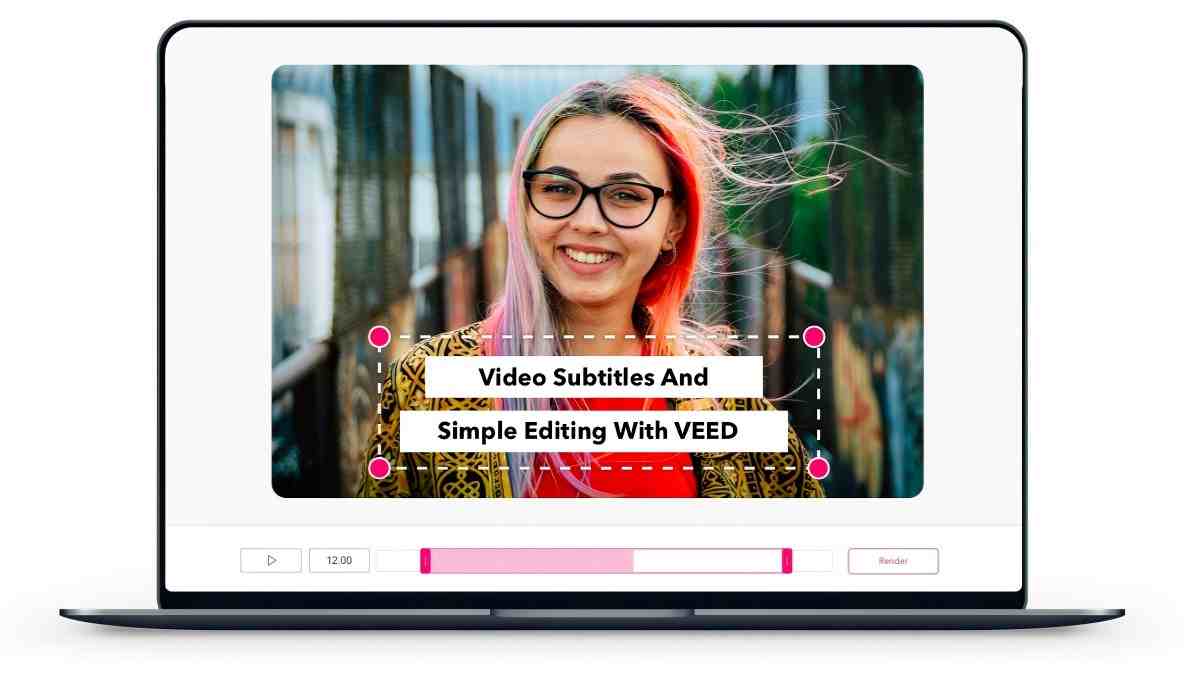
Use VEED to easily edit video captions
1 / 4About Sabba Keynejad
The VEED development team is a UK-based startup led by Sabba Keynejad and Timur Mamedov. They are dedicated to using AI and cloud technology to build an online video creation platform that “anyone can use with ease,” and are known for their efficiency, product-driven approach, and creator-centric focus.
Clicking “Visit Official Site” takes you to VEED's website. Pricing and features may have changed since this review was published.
Discussion(0 comments)
No comments yet. Be the first to share your thoughts!
You Might Also Like
More Video AI tools worth your time
Runway Gen-3 Review: The Best AI Video Generator for Creators
Runway Gen-3 Alpha has transformed AI video generation. We tested it for 30 days across filmmaking, marketing, and social media content creation.

OpenAI Sora Review 2026: The Most Realistic AI Video Generator
Sora can generate up to 60-second videos with stunning physical accuracy. We test whether it lives up to the hype and how it compares to Runway and Kling.
HeyGen Review 2026: The Best AI Avatar Video Creator
HeyGen lets you create professional talking-head videos with AI avatars. We test it for marketing, training, and social media content creation.