Fotor AI Review
Fotor AI is a cross-platform, AI-powered visual creation and editing suite launched in 2012, now a top choice for beginners and professionals alike who want pro-level results without complex software like Photoshop.
AI Art Photo Editor | Everimaging Ltd.
...
Part 1: Core AI Features – One-Click Magic for Every Visual Need
AI Photo Editing: Effortless Pro-Level Enhancements Fotor AI’s photo editing tools are its backbone, designed to turn ordinary shots into polished visuals with minimal effort. The AI Photo Enhancer instantly fixes blurriness, boosts contrast, sharpens details, and corrects lighting in one tap—ideal for rescuing low-light or grainy phone photos. Even better, the AI Background Remover and Magic Eraser let you delete backgrounds or unwanted objects (like photobombers or messy clutter) in seconds, no manual masking or complicated selection tools needed. For portrait lovers, 20+ AI retouching tools smooth skin, remove blemishes, whiten teeth, and even adjust facial features naturally, avoiding the over-edited “plastic” look common in other apps. These tools are built for speed and accessibility. You don’t need to learn layers, masks, or complex settings—just upload a photo, pick an AI tool, and let the software do the heavy lifting. The results are consistently professional: crisp product shots for e-commerce, clean portrait backgrounds for LinkedIn, and clutter-free travel photos for Instagram. Unlike free editors that leave watermarks or ruin quality, Fotor AI’s free tier delivers clean, usable results, while paid plans unlock HD exports and advanced tweaks. It’s no wonder this feature is a favorite among casual users and small business owners short on time.
AI Image Generation & Multi-Model Power: Creativity Without Limits Fotor AI’s text-to-image generator is a game-changer for creators who want to turn ideas into visuals fast. It supports text prompts, image-to-image conversion, and 20+ art styles (realism, anime, cyberpunk, watercolor, and more), letting you generate anything from social media illustrations to product mockups. The best part? A single subscription unlocks 30+ top AI models, including Midjourney, FLUX, Veo, and Sora—something no other all-in-one platform offers at this price. Whether you need a photorealistic ad graphic or a whimsical cartoon avatar, you can switch models in one click to match your vision. Beyond basic generation, Fotor AI adds practical extras like AI Expand (Outpainting) to extend image borders for new aspect ratios, AI Replace to swap specific photo regions with text prompts, and AI Headshot Generator to turn selfies into professional LinkedIn/CV portraits. The free tier gives you limited credits to test these features, while paid plans unlock unlimited generation and high-resolution 2K/4K exports. For content creators, this means no more switching between tools: generate, edit, and refine visuals all in one place, saving hours of workflow time.
Part 2: User Experience & Accessibility – Simple for Beginners, Powerful for Pros
Intuitive Interface: Zero Learning Curve for New Users Fotor AI’s interface is its biggest strength for beginners: clean, minimal, and designed with simplicity in mind. The dashboard is organized into clear sections—Photo Edit, AI Generate, Design Templates, Video—so you can find what you need in one click. There are no confusing menus, hidden settings, or technical jargon; every tool has a clear label, and AI features are front and center. Even if you’ve never edited a photo before, you can upload an image, apply an AI enhancer, and export a polished visual in under two minutes. The platform’s cross-platform sync is seamless: start editing on your phone during your commute, finish on your desktop at home, and access your work from any device. Mobile apps mirror the web’s simplicity, with touch-friendly controls and optimized layouts for small screens. Unlike Photoshop, which requires hours of tutorials to master, Fotor AI lets you learn by doing. Tooltips guide new users, and AI Agent Sisi—a chat-based assistant—executes complex edits from simple commands like “make this photo brighter and remove the background”. It’s the definition of “easy to use, hard to outgrow.”
Template Library & AI Agent Sisi: Boost Productivity for Pros For professionals, Fotor AI’s 100,000+ premium templates (1M+ on Pro+) are a productivity goldmine. Templates cover every use case: social media posts, Instagram Reels thumbnails, YouTube banners, e-commerce product listings, flyers, and even resumes. Each template is fully customizable—swap images, edit text, change colors, and add your logo—to match your brand identity. This eliminates the need to design from scratch, making it perfect for marketers and small business owners who need consistent, high-quality visuals fast. The AI Agent Sisi elevates productivity even further. This chat-based assistant understands natural language and executes multiple edits in one go—no manual tool selection needed. For example, you can say “enhance this product photo, remove the background, add a soft blue gradient, and resize it for Instagram,” and Sisi handles every step automatically. Pro+ users unlock batch editing, letting you apply the same AI edits (background removal, resizing) to hundreds of photos at once—a lifesaver for e-commerce sellers and content agencies. It’s simplicity with pro-level power, making Fotor AI suitable for both hobbyists and professionals scaling their visual workflow.
Part 3: Pricing & Value – Affordable Plans for Every Budget
Free Tier: Generous Access for Casual Users Fotor AI’s free tier (Basic) is far more useful than most competitors’ free plans, making it perfect for casual users, students, and hobbyists testing the platform. It includes limited AI credits for photo enhancement and basic image generation, access to free templates, core editing tools, and 512MB cloud storage. While exports have watermarks and AI usage is capped, you can still create clean social media posts, edit personal photos, and generate simple avatars without paying a cent. Daily check-in tasks also lets you earn extra free credits, extending usability for light daily use. This free tier is a huge plus for users on a budget. Unlike Canva’s free plan, which limits AI features heavily, or Midjourney, which requires immediate payment, Fotor AI lets you fully test its core tools before subscribing. You can experiment with AI background removal, try different art styles in the generator, and play with templates—all without entering a credit card. For casual users who only need occasional edits or social media visuals, the free tier is often enough to meet their needs, making Fotor AI one of the most accessible AI visual tools on the market.
Paid Plans: Premium Power at Budget-Friendly Prices For power users and professionals, Fotor AI’s paid plans deliver exceptional value, with transparent pricing starting at $3.33/month (annual Pro plan). The **Pro plan ($8.99/month or $39.99/year)** unlocks 100 monthly AI credits, HD watermark-free exports, 100,000+ premium templates, 2GB cloud storage, and priority support. It’s ideal for content creators, social media managers, and small business owners who need regular AI edits and high-quality exports without breaking the bank. The Pro+ plan ($19.99/month or $89.99/year) is built for professionals and teams, offering 300 monthly AI credits, batch editing, 100GB cloud storage, brand kits, commercial stock photos, and AI slideshow generation. This is perfect for e-commerce sellers, marketing agencies, and designers scaling their workflow. Compared to competitors like Canva ($12.99/month for Pro) or Adobe Creative Cloud ($54.99/month), Fotor AI’s paid plans are significantly cheaper while including more AI features and multi-model access. It’s affordable luxury—pro-level AI power at a price that fits small business and creator budgets.
Part 4: Drawbacks & Final Verdict – Who Fotor AI Is (and Isn’t) For
Key Limitations: Credit System & Generation Depth Gaps Fotor AI isn’t perfect, and it has clear limitations to consider before subscribing. First, its credit-based system can be confusing for new users: every AI action (enhancement, generation, background removal) uses credits, which expire monthly. While Pro/Pro+ plans include enough credits for most users, heavy generators may run out quickly, requiring additional purchases. Second, while it offers 30+ AI models, its native image generator lacks the depth of dedicated tools like Midjourney or DALL-E 3—complex prompts may produce inconsistent results, and fine-tuning options are limited. Third, video tools are less robust than photo features: AI video generation and editing are available but lag behind dedicated video AI tools in quality and speed. Finally, while templates are abundant, niche industry templates (e.g., medical or legal) are limited compared to Canva. These drawbacks aren’t dealbreakers for its target audience, but they mean Fotor AI isn’t ideal for professional graphic designers needing pixel-perfect control or AI artists focused solely on complex image generation.
Final Verdict: The Best All-in-One AI Visual Tool for 2026 Fotor AI is the most well-rounded all-in-one AI visual tool in 2026, balancing simplicity, power, and affordability like no other platform. It’s perfect for social media creators, small business owners, hobbyist photographers, marketers, and students who want to create professional visuals fast without learning complex software or paying for expensive subscriptions. Its one-click AI tools, massive template library, multi-model generation, and cross-platform access make it irreplaceable for everyday visual tasks. If you’re a professional graphic designer needing advanced layer control or an AI artist focused on hyper-detailed generation, stick with Photoshop or Midjourney. But if you’re tired of switching between 5 different apps to edit photos, generate graphics, and design social posts, Fotor AI is worth every penny. It’s not just an app—it’s a creative partner that makes professional visual creation accessible to everyone, regardless of skill or budget. Overall, Fotor AI isn’t the most advanced AI tool on the market—but it’s the most practical, user-friendly, and cost-effective one for the majority of creators. For anyone looking to streamline their visual workflow in 2026, it’s a must-try.
Fotor AI — Interface Screenshots
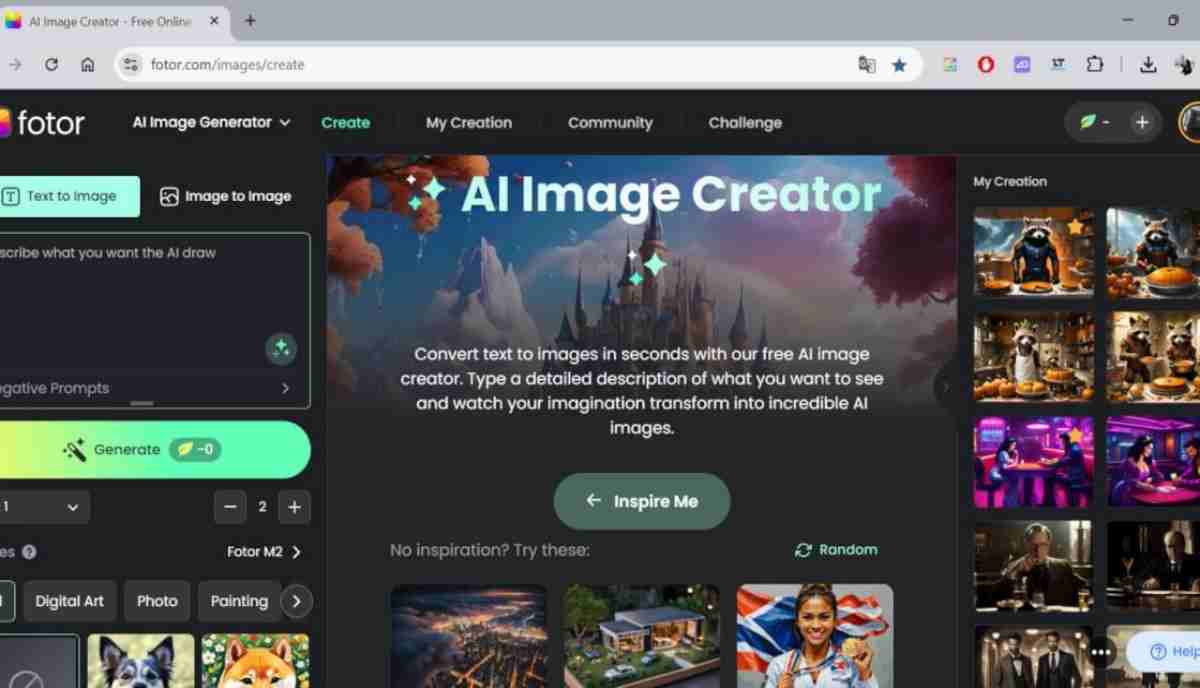
All-in-one AI vision tool
1 / 4About AI Art Photo Editor | Everimaging Ltd.
Clicking “Visit Official Site” takes you to Fotor AI's website. Pricing and features may have changed since this review was published.
Discussion(0 comments)
No comments yet. Be the first to share your thoughts!
You Might Also Like
More Image AI tools worth your time

Midjourney v7 Review: Still the King of AI Image Generation?
Midjourney v7 dropped with massive quality improvements. We tested it against DALL-E 3, Stable Diffusion, and Adobe Firefly to find out if it's still worth the subscription.
DALL-E 3 Review 2026: OpenAI's Image Generator Gets Smarter
DALL-E 3 is now built into ChatGPT Plus. We test its prompt accuracy, image quality, and whether it can compete with Midjourney for professional creative work.
Stable Diffusion 3.5 Review: The Best Free AI Image Generator
Stable Diffusion 3.5 is open-source and free. We test whether it can match paid tools like Midjourney and DALL-E 3 for quality and ease of use.